Wednesday, November 21, 2012

java 7 features


Java 7 Features:

In Java SE 7 and later, any number of underscore characters (_) can appear anywhere between digits in a numerical literal. This feature enables you, for example. To separate groups of digits in numeric literals, which can improve the readability of your code.

For instance, if your code contains numbers with many digits, you can use an underscore character to separate digits in groups of three, similar to how you would use a punctuation mark like a comma, or a space, as a separator.
Example:
package com.jsl.core;
public class Numbers {
              public static void main(String[] args) {
                     long cardno=4214920316734659l;
                     long ccno=4214_9203_1673_4659l;
                     System.out.println(cardno);
                     System.out.println(ccno);
              }
}

You can place underscores only between digits; you cannot place underscores in the following places:
At the beginning or end of a number
            Adjacent to a decimal point in a floating point literal
Prior to an F or L suffix
In positions where a string of digits is expected

Diamond
Java 1.6 we must write the
List<Product> list6=new ArrayList<Product>();
From java 1.7
           List<Product> list7=new ArrayList< >();

package com.jsl.core;

import java.util.ArrayList;
import java.util.List;

class Product{
       String name;
       public Product(String name){
              this.name=name;
       }
       @Override
       public String toString() {
                     return "The product name is :"+name;
       }
}
public class Numbers {
              public static void main(String[] args) {
                           List<Product> list6=new ArrayList<Product>();
                           list6.add(new Product("Laptop"));
                           list6.add(new Product("Monitor"));
                           System.out.println(list6);
                          
                           /* From java 1.7 we can use */
                          
                           List<Product> list7=new ArrayList<>();
                           list7.add(new Product("Laptop"));
                           list7.add(new Product("Monitor"));
                           System.out.println(list7);
                          
              }
}
Catch with multiple exceptions
Since Java 7 you can write it like this, which makes our lives a lot easier:
package com.jsl.core;
public class Numbers {
 public static void main(String[] args) {
 try{
       String name="Krish";
       System.out.println(name.substring(2,8));
       int res=10/0;
       System.out.println(res);
    }catch(StringIndexOutOfBoundsException | ArithmeticException |
                                                       NullPointerException e){
           e.printStackTrace();
       }
 }
}


String with switch statement

Since Java 7 one can use string variables in switch clauses. Here is an example:

package com.jsl.core;
public class Numbers {
              public static void main(String[] args) {
                           String month="Mar";
                           switch(month){
                           case "Jan":System.out.println("Jan");
                                                break;
                           case "Feb":System.out.println("Feb");
                                      break;
                           case "Mar" : System.out.println("Mar");
                                       break;
                           default :System.out.println("Default ");
                           }
              }
}


Try with resource handling
The compiler detects unhandled exceptions thrown by automatic close() invocation on a resource.
package com.jsl.core;
import java.io.BufferedReader;
import java.io.FileReader;
import java.io.IOException;

public class Numbers {
    public static void main(String[] args) {
    try(BufferedReader bis =new BufferedReader(new FileReader("welcome.txt"))){
                                 
                     String message=null;
                     while((message=bis.readLine())!=null){
                           System.out.println(message);
                     }
              }catch (IOException e) {
                     e.printStackTrace();
              }
                          
              }
}

Friday, November 2, 2012

Java program without main method

Writing java program without main method


package com.jsl.sta.core;
public class StaticDemo {
static{
System.out.println("Block-1");
System.exit(0);
}
}

The above code will execute upto java 1.6 but it won't be executed in java 1.7 and gives error message


Error: Main method not found in class com.jsl.sta.core.StaticDemo, please define the main method as:

public static void main(String[] args)


In Java 7 without main method java program can't be executed.


Note:

If ask some one you can say still 1.6 its fine, Printing some message using static block without main method, But In Java 7 its required main method in order to execute java program.

Saturday, October 13, 2012

ServletContextListener


public interface ServletContextListener extends java.util.EventListener

Implementations of this interface receive notifications about changes to the servlet context of the web application they are part of. To receive notification events, the implementation class must be configured in the deployment descriptor for the web application.

Methods
void
contextDestroyed(ServletContextEvent sce)
          Notification that the servlet context is about to be shut down.
 void
contextInitialized(ServletContextEvent sce)
          Notification that the web application initialization process is starting.


Web.xml


  servlet_demo
  
    index.html


   com.jsl.servlet.StoreUsers


   viewUsers
   com.jsl.servlet.ViewUserList
  
  
   viewUsers
   /viewUsers
  

StoreUsers.java

package com.jsl.servlet;

import java.util.ArrayList;
import java.util.List;

import javax.servlet.ServletContext;
import javax.servlet.ServletContextEvent;
import javax.servlet.ServletContextListener;

public class StoreUsers implements ServletContextListener {
 List list=new ArrayList();
 @Override
 public void contextDestroyed(ServletContextEvent event) {
  System.out.println("Context Detsroy method invoked");
  list=null;
 }

 @Override
 public void contextInitialized(ServletContextEvent event) {
  System.out.println("Context  initilized method invoked");
  
  
  list.add("Krish");
  list.add("Balu");
  list.add("Mani");
  ServletContext context=event.getServletContext();
  context.setAttribute("users", list);
  
 }

}

ViewUserList.java

package com.jsl.servlet;
import java.io.IOException;
import java.io.PrintWriter;
import java.util.List;
import javax.servlet.ServletContext;
import javax.servlet.ServletException;
import javax.servlet.http.HttpServlet;
import javax.servlet.http.HttpServletRequest;
import javax.servlet.http.HttpServletResponse;

public class ViewUserList extends HttpServlet {
  @Override
  protected void doGet(HttpServletRequest req, HttpServletResponse resp)
    throws ServletException, IOException {
   
   ServletContext context=getServletContext();
   
   resp.setContentType("text/html");
   PrintWriter out=resp.getWriter();
   
                  out.print("<html><head><title>Users list</title></head>");
                  out.print("<body>");
                  out.print("<h3> users list is </h3>");
                  out.print("<hr>");
                  List
                   users=(List) context.getAttribute("users");
                  for(String user:users){
                        out.print("<h5>"+user+"</h5>");
                  }
                  out.print("</body>");
                  out.print("</html>");
  }
}

index.html

<!DOCTYPE html PUBLIC "-//W3C//DTD HTML 4.01 Transitional//EN" "http://www.w3.org/TR/html4/loose.dtd">
<html>


Insert title here


  Users List

</html>

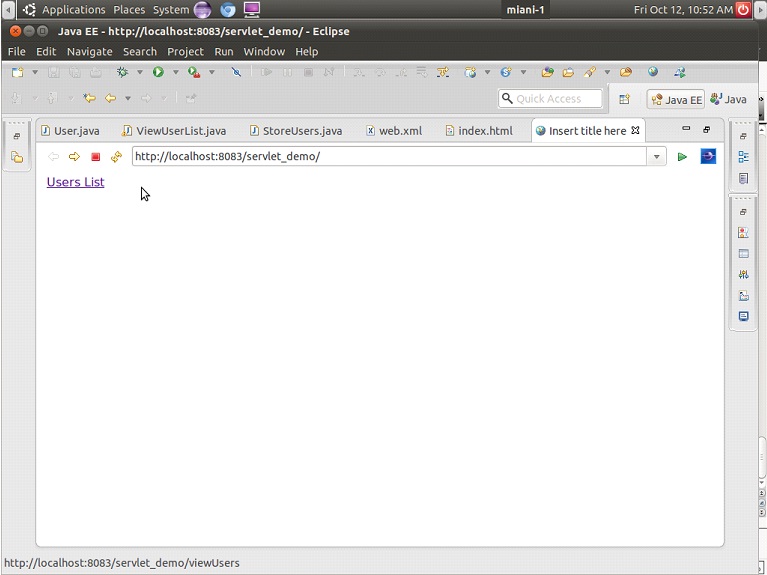
http://localhost:8083/servlet_demo/


http://localhost:8083/servlet_demo/viewUsers


Same example in servlet 3.0


web.xml


 servlet_demo
  
   
    index.html


StoreUsers.java

package com.jsl.servlet;

import java.util.ArrayList;
import java.util.List;

import javax.servlet.ServletContext;
import javax.servlet.ServletContextEvent;
import javax.servlet.ServletContextListener;
import javax.servlet.annotation.WebListener;
 

public class StoreUsers implements ServletContextListener {
 List list=new ArrayList();
 @Override
 public void contextDestroyed(ServletContextEvent event) {
  System.out.println("Context Detsroy method invoked");
  list=null;
 }

 @Override
 public void contextInitialized(ServletContextEvent event) {
  System.out.println("Context  initilized method invoked");
  
  
  list.add("Krish");
  list.add("Balu");
  list.add("Mani");
  ServletContext context=event.getServletContext();
  context.setAttribute("users", list);
  
 }

}

ViewUserList.java

package com.jsl.servlet;
import java.io.IOException;
import java.io.PrintWriter;
import java.util.List;
import javax.servlet.ServletContext;
import javax.servlet.ServletException;
import javax.servlet.annotation.WebServlet;
import javax.servlet.http.HttpServlet;
import javax.servlet.http.HttpServletRequest;
import javax.servlet.http.HttpServletResponse;

@WebServlet("/viewUsers")

public class ViewUserList extends HttpServlet {
  @Override
  protected void doGet(HttpServletRequest req, HttpServletResponse resp)
    throws ServletException, IOException {
   
   ServletContext context=getServletContext();
   
   resp.setContentType("text/html");
    PrintWriter out=resp.getWriter();
   
                  out.print("<html><head><title>Users list</title></head>");
                  out.print("<body>");
                  out.print("<h3> users list is </h3>");
                  out.print("<hr>");
                  List
                   users=(List) context.getAttribute("users");
                  for(String user:users){
                        out.print("<h5>"+user+"</h5>");
                  }
                  out.print("</body>");
                  out.print("</html>");
   
  }
}


ServletContextAttributeListener


public interface ServletContextAttributeListener extends java.util.EventListener

Implementations of this interface receive notifications of changes to the attribute list on the servlet context of a web application. To receive notification events, the implementation class must be configured in the deployment descriptor for the web application.
package com.jsl.servlet;

import java.io.IOException;

import javax.servlet.ServletContext;
import javax.servlet.ServletException;
import javax.servlet.annotation.WebServlet;
import javax.servlet.http.HttpServlet;
import javax.servlet.http.HttpServletRequest;
import javax.servlet.http.HttpServletResponse;

@WebServlet("/users")
public class UserServlet extends HttpServlet {
   @Override
   protected void doGet(HttpServletRequest req, HttpServletResponse resp)
     throws ServletException, IOException {
    ServletContext context=getServletContext();
    context.setAttribute("user1", "Krish");
    context.setAttribute("user2", "Krish");
    context.setAttribute("user3", "Balu");
    context.removeAttribute("user2");
    context.setAttribute("user3", "Balakrishna");
   }
}

package com.jsl.servlet;
import java.util.Date;

import javax.servlet.ServletContextAttributeEvent;
import javax.servlet.ServletContextAttributeListener;
import javax.servlet.annotation.WebListener;

@WebListener
public class UserListner implements ServletContextAttributeListener{
 @Override
 public void attributeAdded(ServletContextAttributeEvent event) {
   System.out.println("The attribute is added "+event.getName()+" "+new Date());
  
 }

 @Override
 public void attributeRemoved(ServletContextAttributeEvent event) {
  System.out.println("The attribute is removed "+event.getName()+" "+new Date());
  
 }

 @Override
 public void attributeReplaced(ServletContextAttributeEvent event) {
  System.out.println("The attribute is replaced "+event.getName()+" "+new Date());
  
 }


}
http://localhost:8083/servlet_demo/users

The servlet console display the notifications


Servlet Config and Context


ServletConfig:

A servlet configuration object used by a servlet container to pass information to a servlet during initialization. 

Methods of ServletConfig:

java.lang.String getInitParameter(java.lang.String name)
          
Returns a String containing the value of the named initialization parameter, or null if the parameter does not exist.

java.util.Enumeration getInitParameterNames()
     
Returns the names of the servlet's initialization parameters as an Enumeration of String objects, or an empty Enumeration if the servlet has no initialization parameters.

ServletContext  getServletContext()

          Returns a reference to the ServletContext in which the caller is executing.
 
java.lang.String getServletName()

          Returns the name of this servlet instance.


To get the ServletConfig Object

        ServletConfig config = getServletConfig();


web.xml


Servlet_demo

index.html


  simpleServlet
  com.jsl.servlets.SimpleServlet
  
   driver
   oracle.jdbc.driver.OracleDriver


  simpleServlet
  /simple


SimpleServlet.java

packagecom.jsl.servlets;

importjava.io.IOException;
importjava.io.PrintWriter;
importjavax.servlet.ServletConfig;
importjavax.servlet.ServletException;
importjavax.servlet.http.HttpServlet;
importjavax.servlet.http.HttpServletRequest;
importjavax.servlet.http.HttpServletResponse;
publicclassSimpleServletextendsHttpServlet {
 privatestaticfinallongserialVersionUID = 1L;
 protectedvoiddoGet(HttpServletRequest request, HttpServletResponse response) throwsServletException, IOException {
   ServletConfigconfig=getServletConfig();
   response.setContentType("text/html");
   PrintWriter out=response.getWriter();
   out.print("<html><head><title>View Dept Details</head>");
   out.print("<body>");
   String driver=config.getInitParameter("driver");
   out.print("

The Driver name is using servlet 3.0 :

"+driver); out.print("</body>"); out.print("</html>"); } protectedvoiddoPost(HttpServletRequest request, HttpServletResponse response) throwsServletException, IOException { } }


             Servlet 3.0 the init parameters can be set by using the annotaions. we no need to configure in the web.xml


packagecom.jsl.servlets;

importjava.io.IOException;
importjava.io.PrintWriter;
importjavax.servlet.ServletConfig;
importjavax.servlet.ServletException;
importjavax.servlet.annotation.WebInitParam;
importjavax.servlet.annotation.WebServlet;
importjavax.servlet.http.HttpServlet;
importjavax.servlet.http.HttpServletRequest;
importjavax.servlet.http.HttpServletResponse;
@WebServlet(
 urlPatterns={"/simple"},
 initParams={
   @WebInitParam(name="driver",value="jdbc.oracle.driver.OracleDrvier")
 }
)
publicclassSimpleServletextendsHttpServlet {
 privatestaticfinallongserialVersionUID = 1L;
 protectedvoiddoGet(HttpServletRequest request, HttpServletResponse response) throwsServletException, IOException {
   ServletConfigconfig=getServletConfig();
   response.setContentType("text/html");
   PrintWriter out=response.getWriter();
   out.print("<html><head><title>View Dept Details</head>");
   out.print("<body>");
   String driver=config.getInitParameter("driver");
   out.print("

The Driver name is using servlet 3.0 :

"+driver); out.print("</body>"); out.print("</html>"); } protectedvoiddoPost(HttpServletRequest request, HttpServletResponse response) throwsServletException, IOException { } }


Servlet Context

public interface ServletContext

Defines a set of methods that a servlet uses to communicate with its servlet container, for example, to get the MIME type of a file, dispatch requests, or write to a log file.

There is one context per "web application" per Java Virtual Machine. (A "web application" is a collection of servlets and content installed under a specific subset of the server's URL namespace such as /catalog and possibly installed via a .war file.)

In the case of a web application marked "distributed" in its deployment descriptor, there will be one context instance for each virtual machine. In this situation, the context cannot be used as a location to share global information (because the information won't be truly global). Use an external resource like a database instead.

The ServletContext object is contained within the ServletConfig object, which the Web server provides the servlet when the servlet is initialized. 


The context parameters can be set in the web.xml

    <web-app> 
        <context-param>
               <param-name>driver</param-name>
               <param-value>oracle.jdbc.driver.OracleDriver</param-value>
          </context-param>
    </web-app>


To read this context-param

    ServletContext context=getServletContext();
    String dirver=context.getInitParam("driver");


Diffrence Between the ServletConfig and ServletContext 

ServletConfig
ServletContext
A servlet configuration object used by a servlet container to pass information to a servlet during initialization. 
A ServletContext defines a set of methods that a servlet uses to communicate with its servlet container.
For each servlet there will one ServletConfig object
The entire web application will have one ServletContext Object
The parameters specified in web.xml inside the <servlet> tag
The paramemters are specified in web.xml inside <web-app>
These parameters can be read by using config.getInitParameter(“name”);
These parameters can be read by using context.getInitParameter(“name”);

Wednesday, October 10, 2012

Servlet RequestDispatcher

1.     RequestDispatcher Defines an object that receives requests from the client and sends them to any resource (such as a servlet, HTML file, or JSP file) on the server.
2.    The servlet container creates the RequestDispatcher object, which is used as a wrapper around a server resource located at a particular path or given by a particular name.
3.   This interface is intended to wrap servlets, but a servlet container can create RequestDispatcher objects to wrap any type of resource.

Method Summary

void forward(ServletRequest request, ServletResponse response)

      Forwards a request from a servlet to another resource (servlet, JSP file, or HTML file) on the server. This method allows one servlet to do preliminary processing of a request and another resource to generate the response.
      
      For a RequestDispatcher obtained via getRequestDispatcher(), the ServletRequest    object has its path elements and parameters adjusted to match the path of the target resource.

      Forward should be called before the response has been committed to the client (before response body output has been flushed). If the response already has been committed, this method throws an IllegalStateException. Uncommitted output in the response buffer is automatically cleared before the forward.

      The request and response parameters must be either the same objects as were passed to the calling servlet's service method or be sub classes of the ServletRequestWrapper  or   ServletResponseWrapper classes that wrap them.


packagecom.jsl.servlet;
importjava.io.IOException;
importjavax.servlet.*;
importjavax.servlet.annotation.WebServlet;
importjavax.servlet.http.*;

@WebServlet("/login")
public class LoginServlet extends HttpServlet {
 private static final long serialVersionUID = 1L;

 protected void doGet(HttpServletRequest request, HttpServletResponse response) throws ServletException, IOException {
    
    response.sendRedirect("index.html");
    
    request.getRequestDispatcher("/welcome").forward(request,response);
 }
 protected void doPost(HttpServletRequest request, HttpServletResponse response) throws ServletException, IOException {
   
 }
}


      In this example the response has been committed, We are trying to forward to another servlet, It throws the IllegalStateException

Login.html

<!DOCTYPEHTMLPUBLIC"-//W3C//DTD HTML 4.01 Transitional//EN"
"http://www.w3.org/TR/html4/loose.dtd">
<html>


User Login E-Mail
* Password *
</html>

LoginServlet.java

packagecom.jsl.servlet;
importjava.io.IOException;
importjava.io.PrintWriter;
importjavax.servlet.*;
importjavax.servlet.annotation.WebServlet;
importjavax.servlet.http.*;
@WebServlet("/login")
publicclassLoginServletextendsHttpServlet {

privatestaticfinallongserialVersionUID = 1L;
protectedvoiddoGet(HttpServletRequest request, HttpServletResponse response) throwsServletException, IOException {
  RequestDispatcherrd=null;
  String email=request.getParameter("email");
  String password=request.getParameter("password");
  PrintWriter out=response.getWriter();
  response.setContentType("text/html");
  out.print("");
  out.print("<html><head>Login Page</head>");
  out.print("<body>");   
  if(email.equals(" ") &&password.equals(" ")){
   out.print("Please verify user name and password");
   rd=request.getRequestDispatcher("login.html");
   rd.include(request, response);
  }else{
   if(email.equals("admin@jsltech.com") &&password.equals("admin")){
    rd=request.getRequestDispatcher("welcome");
    rd.forward(request, response);
   }else{
   out.print("Please verify user name and password");
    rd=request.getRequestDispatcher("login.html");
    rd.include(request, response);
    }
   }
   
  out.print("</body>");
  out.print("</html>");
   
   
 }
protectedvoiddoPost(HttpServletRequest request, HttpServletResponse response) throwsServletException, IOException {
   doGet(request, response);
 }

}

Welcome.java

packagecom.jsl.servlet;
importjava.io.IOException;
importjava.io.PrintWriter;
importjavax.servlet.ServletException;
importjavax.servlet.annotation.WebServlet;
importjavax.servlet.http.HttpServlet;
importjavax.servlet.http.HttpServletRequest;
importjavax.servlet.http.HttpServletResponse;

@WebServlet("/welcome")
publicclass Welcome extendsHttpServlet {
 privatestaticfinallongserialVersionUID = 1L;
 protectedvoiddoPost(HttpServletRequest request, HttpServletResponse response) throwsServletException, IOException {
  PrintWriter out=response.getWriter();
  response.setContentType("text/html");
  out.print("");
  out.print("<html><head>Login Page</head>");
  out.print("<body>"); 
   out.print("

Welcome to JSL Tech

"); out.print("Login Page"); out.print("</body>"); out.print("</html>"); } }

When click on

http://localhost:8080/Servlet_Example/login.html


      If user name or password wrong, then along with the error message the login page will be included


      If user name and password correct then action will go to the welcome servlet and display the output…


void include(ServletRequest request, ServletResponse response)

             Includes the content of a resource (servlet, JSP page, HTML file) in the response. In essence, this method enables programmatic server-side includes.

      The ServletResponse object has its path elements and parameters remain unchanged from the caller's. The included servlet cannot change the response status code or set headers; any attempt to make a change is ignored.

      The request and response parameters must be either the same objects as were passed to the calling servlet's service method or be subclasses of theServletRequestWrapper or ServletResponseWrapper classes that wrap them.

      What is the difference between the include() and forward() methods?

include()
forward()
        The RequestDispatcherinclude() method inserts the the contents of the specified resource directly in the flow of the servlet response, as if it were part of the calling servlet.  
   The RequestDispatcherforward() method is used to show a different resource in place of the servlet that was originally called.
      If you include a servlet or JSP document, the included resource must not attempt to change the response status code or HTTP headers, any such request will be ignored.
          The forwarded resource may be another servlet, JSP or static HTML document, but the response is issued under the same URL that was originally requested. In other words, it is not the same as a redirection.
              The include() method is often used   to include common "boilerplate" text or template markup that may be included by many servlets.
              The forward() method is often used where a servlet is taking a controller role; processing some input and deciding the outcome by returning a particular response page.


Wednesday, September 19, 2012

Servlet Connection pool eaxmple

Connection pooling:


Create context.xml


Create employee class

package com.jsl.servlet.demo;

public class Employee {
        private int empno;
        private String ename;
        private String job;
        private double sal;
        public int getEmpno() {
            return empno;
        }
        public void setEmpno(int empno) {
            this.empno = empno;
        }
        public String getEname() {
            return ename;
        }
        public void setEname(String ename) {
            this.ename = ename;
        }
        public String getJob() {
            return job;
        }
        public void setJob(String job) {
            this.job = job;
        }
        public double getSal() {
            return sal;
        }
        public void setSal(double sal) {
            this.sal = sal;
        }
}

Creating a EmployeeServlet Class


package com.jsl.servlet.demo;
import java.io.IOException;
import java.io.PrintWriter;
import java.sql.Connection;
import java.sql.ResultSet;
import java.sql.Statement;
import java.util.ArrayList;
import java.util.List;
import javax.naming.Context;
import javax.naming.InitialContext;
import javax.naming.NamingException;
import javax.servlet.ServletException;
import javax.servlet.annotation.WebServlet;
import javax.servlet.http.HttpServlet;
import javax.servlet.http.HttpServletRequest;
import javax.servlet.http.HttpServletResponse;
import javax.sql.DataSource;
 
@WebServlet("/getEmployee")
public class EmployeeServlet extends HttpServlet {
    private static final long serialVersionUID = 1L;
    Connection con=null;
    Statement st=null;
    ResultSet rs=null;
    DataSource ds=null;
    Context cx=null;
    @Override
    public void init() throws ServletException {
            try {
                cx=new InitialContext();
                Context envContext = (Context) cx.lookup("java:/comp/env");
                ds = (DataSource) envContext.lookup("jdbc/employee");
 
            } catch (NamingException e) {
                e.printStackTrace();
            }
            
    }
    protected void doGet(HttpServletRequest request, HttpServletResponse response) throws ServletException, IOException {
            PrintWriter out=response.getWriter();
            response.setContentType("text/html");
            out.print("Employee List");
            out.print("");
            List list=getEmployeeList();
            out.print("");
            out.print("");
            for(Employee emp:list){
                out.print("");
                out.print("");
                out.print("");
                out.print("");
                
            }
            out.print("
EmpNoEmpnameJobSal
"+emp.getEmpno()+""+emp.getEname()+""+emp.getJob()+""+emp.getSal()+"
");                      out.print("
");         out.print("");     }     private List getEmployeeList() {         List emplist=new ArrayList();         try{             con=ds.getConnection();             st=con.createStatement();             rs=st.executeQuery("select empno,ename,job,sal from emp");             while(rs.next()){                 Employee emp=new Employee();                 emp.setEmpno(rs.getInt("empno"));                 emp.setEname(rs.getString("ename"));                 emp.setJob(rs.getString("job"));                 emp.setSal(rs.getDouble("sal"));                 emplist.add(emp);             }                      }catch(Exception e){             e.printStackTrace();         }                  return emplist;     }     protected void doPost(HttpServletRequest request, HttpServletResponse response) throws ServletException, IOException {             doGet(request, response);     } }


http://localhost:8089/Employee/getEmployee


 Download the SourceCode     Download the post


Monday, September 3, 2012

Hibernate Simple Example

Download distribution  file

http://sourceforge.net/projects/hibernate/files/hibernate3/3.6.10.Final/hibernate-distribution-3.6.10.Final-dist.zip/download

Extract the zip file


Create new java project

then add the  lib folder copy the all the jar


Member.java

package com.jsl.hibernate.demo;
public class Member {

  private int mid;
  private String name;
  private String email;
  private String city;
  
  public void setMid(int mid) {
   this.mid = mid;
  }
  public int getMid() {
   return mid;
  }
  public void setName(String name) {
   this.name = name;
  }
  public String getName() {
   return name;
  }
  public void setEmail(String email) {
   this.email = email;
  }
  public String getEmail() {
   return email;
  }
  public void setCity(String city) {
   this.city = city;
  }
  public String getCity() {
   return city;
  }
}

hibernate.cfg.xml


        oracle.jdbc.driver.OracleDriver
        jdbc:oracle:thin:@localhost:1521:xe
        java
        java

        
        1

        
        org.hibernate.dialect.OracleDialect


        true

        
        create


member.hbm.xml


Manager.java

package com.jsl.hibernate.demo;
import org.hibernate.Session;
import org.hibernate.SessionFactory;
import org.hibernate.cfg.Configuration;
public class Manager {
  public static void main(String[] args) {
   Member member=new Member();
   member.setMid(1001);
   member.setName("Krish");
   member.setEmail("krish@gmail.com");
   member.setCity("Bangalore");
   
   SessionFactory factory=new Configuration().configure().buildSessionFactory();
   Session session=factory.openSession();
   org.hibernate.Transaction tx=session.beginTransaction();
   session.save(member);
   tx.commit();
   session.close();
  }
}
if run the manger.java the output will be
SLF4J: Failed to load class "org.slf4j.impl.StaticLoggerBinder".
SLF4J: Defaulting to no-operation (NOP) logger implementation
SLF4J: See http://www.slf4j.org/codes.html#StaticLoggerBinder for further details.

Hibernate: insert into MEMBER (NAME, EMAIL, CITY, MID) values (?, ?, ?, ?)

Spring Boot 3 : JWT with SecurityFilterChain, AuthorizeHttpRequests, RequestMatchers

pom.xml <?xml version="1.0" encoding="UTF-8"?> <project xmlns="http://maven.apache.org/POM/4.0.0...